VRF和OSPF配置
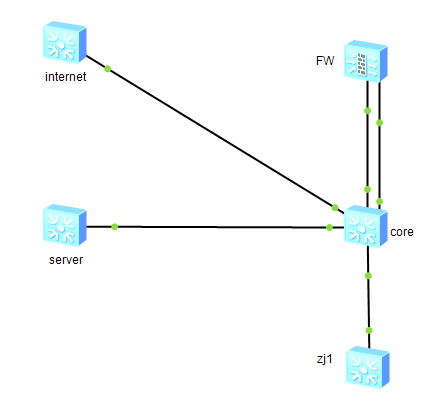
防火墙配置
1、创建虚拟墙IT/OT
2、创建子接口,配置IP地址

3、虚拟墙默认策略全放通
4、配置静态路由
oa


配置命令
vsys name oa 1
 assign interface GigabitEthernet1/0/0.1
 assign interface GigabitEthernet1/0/1.1
#
vsys name ot 2
 assign interface GigabitEthernet1/0/0.2
 assign interface GigabitEthernet1/0/1.2
#
ip vpn-instance default
 ipv4-family
#
ip vpn-instance oa
 ipv4-family
#
ip vpn-instance ot
 ipv4-family
#
interface GigabitEthernet1/0/0.1
 vlan-type dot1q 2
 ip binding vpn-instance oa
 ip address 192.168.1.2 255.255.255.252
 alias oa
 service-manage ping permit
#
interface GigabitEthernet1/0/0.2
 vlan-type dot1q 4
 ip binding vpn-instance ot
 ip address 192.169.1.2 255.255.255.252
 alias ot
 service-manage ping permit
#
interface GigabitEthernet1/0/1.1
 vlan-type dot1q 6
 ip binding vpn-instance oa
 ip address 192.168.3.2 255.255.255.252
 alias uoa
 service-manage ping permit
#
interface GigabitEthernet1/0/1.2
 vlan-type dot1q 7
 ip binding vpn-instance ot
 ip address 192.169.3.2 255.255.255.252
 alias uot
 service-manage ping permit
#
security-policy
 rule name test
  action permit
#
switch vsys oa
#
security-policy
 default action permit
 default policy logging
 default session logging
 default traffic logging enable
 default packet-filter intrazone enable
#
ip route-static 0.0.0.0 0.0.0.0 GigabitEthernet1/0/1.1 192.168.3.1
ip route-static 1.1.1.1 255.255.255.255 GigabitEthernet1/0/0.1 192.168.1.1
ip route-static 192.168.2.0 255.255.255.0 GigabitEthernet1/0/0.1 192.168.1.1

switch vsys ot
#
security-policy
 default action permit
 default policy logging
 default session logging
 default packet-filter intrazone enable
 #
ip route-static 0.0.0.0 0.0.0.0 GigabitEthernet1/0/1.2 192.169.3.1
ip route-static 2.2.2.2 255.255.255.255 GigabitEthernet1/0/0.2 192.169.1.1
ip route-static 192.169.2.0 255.255.255.0 GigabitEthernet1/0/0.2 192.169.1.1
交换机配置
1、配置汇聚
vlan batch 2 to 3 5
#
ip vpn-instance oa
 ipv4-family
#
ip vpn-instance ot
 ipv4-family
#
interface Vlanif3
 ip binding vpn-instance oa
 ip address 192.168.2.2 255.255.255.0
#
interface Vlanif5
 ip binding vpn-instance ot
 ip address 192.169.2.2 255.255.255.0
#
interface GigabitEthernet0/0/1
 port link-type trunk
 port trunk allow-pass vlan 2 to 4094
#
interface LoopBack1
 ip binding vpn-instance oa
 ip address 1.1.1.1 255.255.255.255
#
interface LoopBack2
 ip binding vpn-instance ot
 ip address 2.2.2.2 255.255.255.255
#
ospf 1 vpn-instance ot
 area 0.0.0.0
  network 192.169.2.0 0.0.0.255
  network 2.2.2.2 0.0.0.0
#
ospf 100 vpn-instance oa
 area 0.0.0.0
  network 192.168.2.0 0.0.0.255
  network 1.1.1.1 0.0.0.0
2、配置核心
vlan batch 2 to 8 10
#
ip vpn-instance oa
 ipv4-family
#
ip vpn-instance ot
 ipv4-family
#
interface Vlanif2
 ip binding vpn-instance oa
 ip address 192.168.1.1 255.255.255.252
#
interface Vlanif3
 ip binding vpn-instance oa
 ip address 192.168.2.1 255.255.255.0
#
interface Vlanif4
 ip binding vpn-instance ot
 ip address 192.169.1.1 255.255.255.252
#
interface Vlanif5
 ip binding vpn-instance ot
 ip address 192.169.2.1 255.255.255.0
#
interface Vlanif6
 ip address 192.168.3.1 255.255.255.252
#
interface Vlanif7
 ip address 192.169.3.1 255.255.255.252
#
interface Vlanif8
 ip address 192.8.8.1 255.255.255.252
#
interface Vlanif10
 ip address 192.10.10.2 255.255.255.252
#去虚拟墙trust接口
interface GigabitEthernet0/0/1
 port link-type trunk
 port trunk allow-pass vlan 2 4
#
interface GigabitEthernet0/0/2
 port link-type trunk
 port trunk allow-pass vlan 2 to 4094
#虚拟墙untrust去public
interface GigabitEthernet0/0/3
 port link-type trunk
 port trunk allow-pass vlan 6 to 7
#
interface GigabitEthernet0/0/4
 port link-type trunk
 port trunk allow-pass vlan 8
#
interface GigabitEthernet0/0/5
 port link-type trunk
 port trunk allow-pass vlan 10
#
interface LoopBack3
 ip address 3.3.3.3 255.255.255.255
#
ospf 1 vpn-instance ot
 default-route-advertise
 vpn-instance-capability simple
 area 0.0.0.0
  network 192.169.1.0 0.0.0.3
  network 192.169.2.0 0.0.0.255
#服务器ospf
ospf 2
 default-route-advertise
 import-route static
 area 0.0.0.0
  network 192.8.8.0 0.0.0.3
#
ospf 100 vpn-instance oa
 default-route-advertise
 vpn-instance-capability simple
 area 0.0.0.0
  network 192.168.1.0 0.0.0.3
  network 192.168.2.0 0.0.0.255
#上网默认路由
ip route-static 0.0.0.0 0.0.0.0 192.10.10.1
#去OA OT路由
ip route-static 1.1.1.1 255.255.255.255 192.168.3.2
ip route-static 2.2.2.2 255.255.255.255 192.169.3.2
ip route-static 192.168.1.0 255.255.255.252 192.168.3.2
ip route-static 192.168.2.0 255.255.255.0 192.168.3.2
ip route-static 192.169.1.0 255.255.255.252 192.169.3.2
ip route-static 192.169.2.0 255.255.255.0 192.169.3.2
#OA OT去PUBLIC路由
ip route-static vpn-instance oa 0.0.0.0 0.0.0.0 192.168.1.2
ip route-static vpn-instance ot 0.0.0.0 0.0.0.0 192.169.1.2
3、配置服务器
vlan batch 8
#
interface Vlanif8
 ip address 192.8.8.2 255.255.255.252
#
interface GigabitEthernet0/0/1
 port link-type trunk
 port trunk allow-pass vlan 8
#
interface LoopBack1
 ip address 4.4.4.4 255.255.255.255
#
ospf 100
 area 0.0.0.0
  network 4.4.4.4 0.0.0.0
  network 192.8.8.0 0.0.0.3
4、配置上网
vlan batch 10
#
interface GigabitEthernet0/0/1
 port link-type trunk
 port trunk allow-pass vlan 10
#
interface LoopBack1
 ip address 5.5.5.5 255.255.255.255
#
ip route-static 1.1.1.1 255.255.255.255 192.10.10.2
ip route-static 2.2.2.2 255.255.255.255 192.10.10.2
ip route-static 3.3.3.3 255.255.255.255 192.10.10.2
ip route-static 4.4.4.4 255.255.255.255 192.10.10.2
ip route-static 192.0.0.0 255.0.0.0 192.10.10.2